You Are Not Using Too Much Claude - You Are Using It the Wrong Way
Most people who hit Claude's limits are not overusing it - they are using it the wrong way. Here are 9 habits that quietly extend how much Claude you can use, with no bigger plan needed.

Naif Asswiel··5 min read
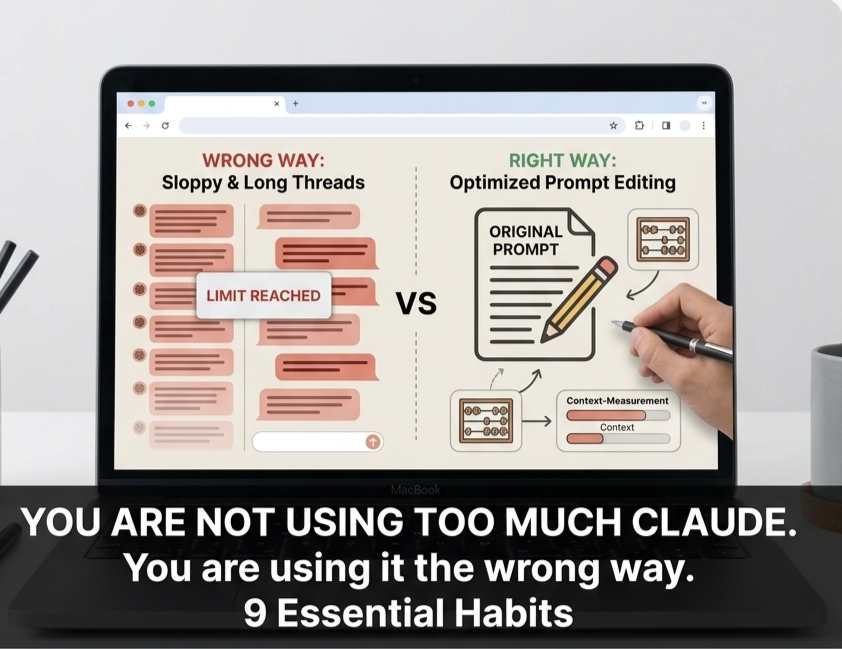
Most people who hit Claude's usage limits do not actually use Claude that much. They just use it badly: long threads, repeated context, the same files re-uploaded every chat, tools left on that they never touch.
The limit is not really a message counter. It tracks how much Claude has to read on every single reply, which means one sloppy 30-message thread can burn more of your limit than a full day of clean, short chats.
Below are 9 habits I have picked up from watching how heavy Claude users actually work. Each one quietly extends how much Claude you can use, without paying for a bigger plan. Save this for the next time you hit the limit before lunch.
1 - Edit your prompt instead of sending a follow-up
When you reply with "no, try again", Claude re-reads the bad answer plus your correction on every future message. The mistake stays in the conversation and you keep paying for it.
Editing the original prompt rewinds the chat back to that point, and the bad attempt disappears from the count entirely. You are not adding to the thread, you are rewriting it.
Why it works: on long, iterative work this single habit can cut your context by up to 80%. Reach for the edit button before you reach for "try again".
2 - The moment you switch topics, open a new chat
Old threads carry every previous message, file, and instruction. Claude re-reads all of it on every reply, even the parts you stopped needing twenty messages ago.
If your new task does not depend on the old one, start fresh. Need to keep something from the previous conversation? Ask Claude to summarize it in a few lines, then paste that summary into a new chat.
Example: you finish debugging a script and now want to write a launch email. Do not continue in the same window. A new chat means Claude carries the email, not the entire debugging history.
3 - Move recurring work into Projects
A Project is a private workspace where you upload your files once (a CV, a brief, a brand book, a course) and add instructions Claude follows in every chat inside it.
Same files, no re-upload. Same rules, no re-typing. Project files are cached, so Claude stops paying full token cost for them on every message.
Best for: repeated work on the same context - a job hunt, a content calendar, study notes, a long writing project.
4 - Stop using Opus for everything
Opus is Anthropic's heaviest model. It is slower, more expensive, and burns your limit faster. Most daily tasks simply do not need it.
Sonnet handles around 80% of real work well: drafting, summarizing, brainstorming, reformatting, quick analysis. Make it your default.
Promote to Opus only when the task fights back: complex strategy, hard reasoning, long technical work. Using the heaviest model for a two-line email is how you run out of limit by noon.
5 - Send the noisy work to Haiku
Haiku is roughly a third of the cost of Sonnet and about twice the speed, with similar quality on routine tasks.
Use it for the boring, repetitive, high-volume work: summarizing long emails, extracting fields from documents, reformatting text, classifying or tagging items.
Save Sonnet and Opus for work that actually needs thinking. Match the model to the difficulty, not to your habit.
6 - Turn off the tools you are not using
Every active tool is a silent tax. When Web search, Research, or extended thinking are switched on, Claude carries their instructions in every reply, even on prompts that never use them.
Writing an email, brainstorming, or fixing a paragraph? Switch them off in the tool menu. You only need them when you actually want Claude to browse the web, dig through sources, or reason at length.
7 - Batch your questions into one structured prompt
Five back-and-forth messages cost far more than one well-built prompt carrying the same five questions. Every follow-up re-reads everything above it.
Example: planning a trip, do not ask in four separate messages (best time to visit, what to pack, top cities, what to eat).
Send one prompt instead: "I am going to Japan in October for 10 days. Give me best-season tips, a packing list, the top 3 cities, and 5 must-try foods." One prompt, one read, every answer.
8 - Tell Claude how to talk, once
Open Settings, then Profile preferences, and add something like: "Be concise. No intros, no recaps. Bullets only when I ask. Skip explanations unless I request them."
These rules apply to every conversation automatically. Claude stops shipping four-paragraph answers when you wanted four bullets.
Why it works: shorter outputs mean fewer tokens, and fewer tokens mean a longer limit. You set it once and it pays off in every chat afterward.
9 - Make Claude interview you before it starts
Before any big task, say: "Before you start, ask me any questions on the parts that are unclear, missing, or could go in different directions."
Writing a cover letter? Claude will ask for the role, the tone, the company. Planning a launch? It will ask for the audience and the goal.
One careful first try beats three rewrites. Lower token cost, better output, and you avoid the cycle of correcting an answer that was built on guesses.
Which habit are you trying first?
Hitting the limit is a habit problem, not a plan problem. None of these require a bigger subscription - they just stop you from wasting the capacity you already have.
Pick one to start with. If I had to choose, habit 1 (editing instead of replying) and habit 2 (a fresh chat per task) give you the biggest return for the least effort. The rest compound from there.
Share this post
Keep reading
More from the notebook





Newsletter
Get new posts in your inbox
Plain-language notes on AI, prompt engineering, and money. No spam, unsubscribe anytime.